Return to the Arch Index.
Arch Index above.Show Bootloader Menu#
Bootloader skips by default. Edit the config to add a timeout:
sudo nano /boot/loader/loader.conf
Uncomment and set:
timeout 5
default Arch Linux
#console-mode keep
Find Windows EFI Partition#
Lets find the windows EFI (either /dev/sdxN or /dev/nvme0n1nN):
lsblk
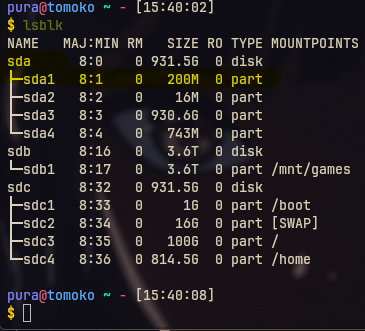
Mount the FAT32 EFI partition (replace /dev/sda1 with your own! It might be different):
sudo mkdir /mnt/temp
sudo mount /dev/sda1 /mnt/temp
running an ls on /mnt/temp shows the following:
ls /mnt/temp
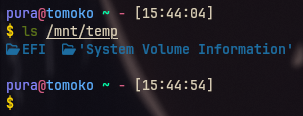
This is exactly what we wanna see 😎 ls /mnt/temp/EFI should show Microsoft. If you see that, you have the right drive. If not, you can always sudo umount /mnt/temp and then sudo mount /dev/sdxN /mnt/temp until you find it.
Copy Windows Boot Files#
We can now copy /mnt/temp/EFI/Microsoft to our /boot/EFI:
sudo cp -r /mnt/temp/EFI/Microsoft /boot/EFI
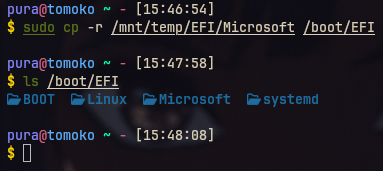
DONE!#
We can now umount /mnt/temp and then reboot. Windows now appears in your systemd-boot menu alongside Arch. Secure Boot compatible! 🐧 Round of applause! You Use Arch, BTW! 🐧