Return to the Arch Index.
Warning: DON’T USE! Might be outdated. Go back to Arch Index above!
Info: These are manual steps to install Minimal KDE. I generally say best to go back and use the scripts which does most work for us.
KDE Plasma 6 (Manual)#
Info: I highly recommend to get terminal and a browser at the very least, before continueing. I opt in for
sudo pacman -S kitty and yay -S brave-binLets start by installing Desktop + SDDM:
sudo pacman -S --needed plasma sddm sddm-kcm partitionmanager hunspell-en_us kdepim-addons kdegraphics-thumbnailers kdenetwork-filesharing kimageformats kio-admin kio-extras kio-fuse libappindicator-gtk3 flatpak flatpak-kcm
After the installation, we can go ahead and enable SDDM and reboot.
sudo systemctl enable sddm
reboot
Login, open terminal (kitty) and lets continue installation.
Now install minimal essential apps (e.g., calculator, clock, notes, media player).
sudo pacman -S --needed kcalc kalarm dolphin dolphin-plugins kate kwrite mpv kitty okular gwenview tealdeer
And we install vlc via flatpak:
flatpak install flathub org.videolan.VLC
NVIDIA Drivers (NVIDIA GPUs Only)#
Disclaimer: Remember, only run this if you are using an
NVIDIA GPU!. If AMD/Intel GPU, you can skip or go to AMD and Intel GPU installation.Nvidia/Wine setup + tests:
sudo pacman -S --needed vulkan-tools mesa-utils wine wine-mono wine-gecko winetricks zenity giflib lib32-giflib libpng lib32-libpng libldap lib32-libldap gnutls lib32-gnutls mpg123 lib32-mpg123 openal lib32-openal v4l-utils lib32-v4l-utils libpulse lib32-libpulse libgpg-error lib32-libgpg-error alsa-plugins lib32-alsa-plugins alsa-lib lib32-alsa-lib libjpeg-turbo lib32-libjpeg-turbo sqlite lib32-sqlite libxcomposite lib32-libxcomposite libxinerama lib32-libgcrypt libgcrypt lib32-libxinerama ncurses lib32-ncurses ocl-icd lib32-ocl-icd libxslt lib32-libxslt libva lib32-libva gtk3 lib32-gtk3 gst-plugins-base-libs lib32-gst-plugins-base-libs vulkan-icd-loader lib32-vulkan-icd-loader vdpauinfo nvidia-dkms nvidia-utils nvidia-settings lib32-nvidia-utils nvidia-libgl lib32-nvidia-libgl libvdpau mesa libglvnd libva-utils lib32-mesa lib32-libvdpau lib32-libglvnd cuda
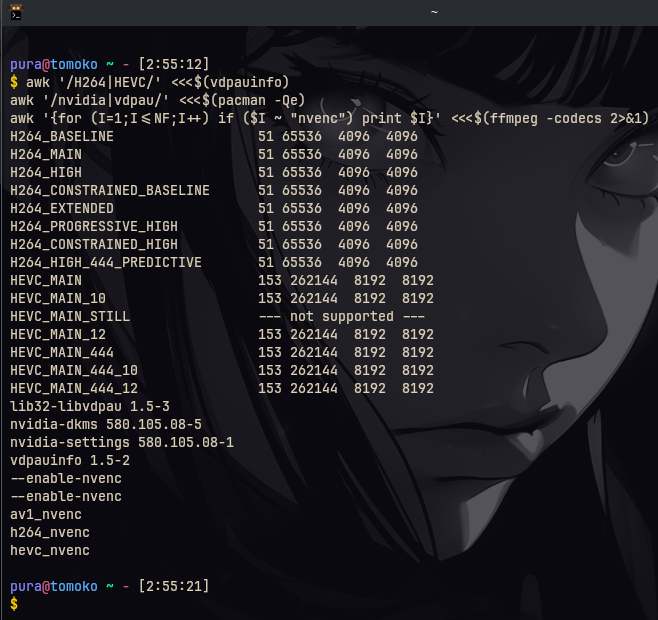
Test, see if you get output (might need a restart to see it all):
awk'/H264|HEVC/' <<<$(vdpauinfo)
awk'/nvidia|vdpau/' <<<$(pacman-Qe)
awk'{for (I=1;I<=NF;I++) if ($I ~ "nvenc") print $I}' <<<$(ffmpeg-codecs 2>&1)
The output should look something like the below image:
Done!#
You’ve completed a solid minimal KDE setup on Arch Linux, complete with essential software. This serves as an excellent foundation. In the next section (Personal), expect my preferred tools and tweaks. Please review them carefully to decide what suits you.